ADEPT Modelling Tool
A good modelling tool is a must for the creation of Architecture Diagrams. Their information must be reliable, traceable and securely accessible. ADEPT uses a Semantic Graph as the information model to achieve this. The graph has been implemented in LIME, our Lean Information Management Engine.
Information Management
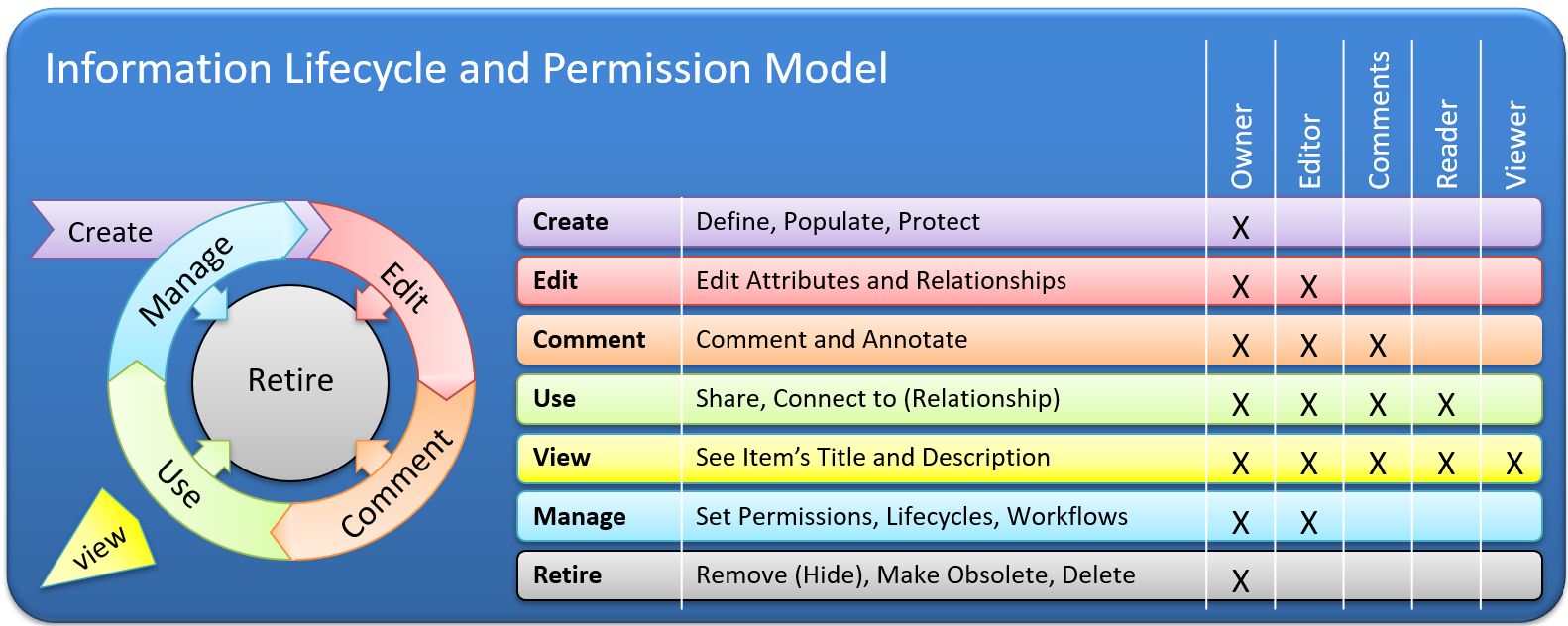
Good information is the principal asset of any development project. It has to be available "in the right format to the right person at the right time". This can be achieved by the appropriate Management of Information over its lifecycle:
- create: make sure that the information item can be easily created by the relevant Roles, is unique (uid), correct (true information) and carries meta data for immediate qualification (creator, date, status, version)
- connect: reuse existing information items to connect to the newly created using semantically verified relationships
- share & protect: information is available in its context, but only to Roles with the applicable permission (view or read)
- annotate: items can be given further information by Roles with the applicable permission (comment)
- edit: Roles with the "Edit Permission" can manage the item's evolution over its lifecycle (aided by auto-versioning)
- manage: The Owner can change the Permissions for an Item or the applicable Workflows for a Type
- retire: The Owner makes sure that their items, which have been superseded or are no longer relevant, get archived
As a result, the items will be easily created, qualified, connected, protected, organized, stored, shared, developed, and retired.
|
One salient aspect of good Information Management is to implement a reliable Lifecycle Management for the Information Items. To achieve this, you must offer the users a strict yet flexible permission model. A typical implementation assigns a Role certain Actions depending on the Lifecycle State of the object and the Role's Permission. |
Information Model
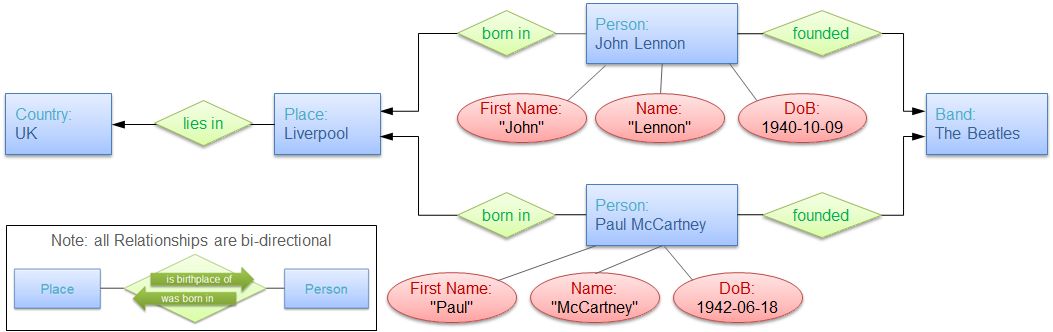
Information can be modelled in many ways and for many purposes. For a complex challenge, you have to prepare for the inevitable: it will change! Semantic Graphs are ideal for this purpose: They are at the same time flexible and strict, allowing the different Roles to contribute to the model as they best can and to consume its contents at their own pace. Semantic Graphs are typically implemented using an 'Entity Relationship Model (ERM)', which is best explained using the following piece of information as an example: "The Beatles were founded by John Lennon and Paul McCartney, both of whom were born in Liverpool (UK) on the 9th of October 1940 and the 18th of June 1942, respectively." The ERM for this information is as follows:
The 4 Principal Model Elements are
- Types: Defining the available Attributes and allowed Relationships of an Entity - A Person has a First Name, Name, and Date of Birth; It can be related to a Place of Birth ("born in" Relationship).
- Entity: Item that is an instance of a type - John Lennon is an Entity of the Type Person.
- Attribute: Facts that are unique to an entity and only exist with it - John Lennon's Name is Lennon.
- Relationship: Item relating two Entities in a bi-directional and semantically meaningful way - John Lennon was born in Liverpool; Liverpool is the birthplace of Paul McCartney.
NOTE: In LIME, Relationship and Attribute Types are NOT elements of an Entity Type definition, but independent Types that allow for re-use and make the model into a graph.
A bigger ERM is shown below. Here, the spheres are the Entities and the lines the semantically defined Relationships.

|
The image illustrates a major advantage of this model: users can get from any Entity to another by following the well-defined Relationships, simply by following logical - or better: semantic - paths. Another important advantage is the model's potential to reuse information through its semantic structure: For example, finding the country in which a person lives without having it modelled as a relationship of person. One can simply go from Person to Address to City, which will have a Relationship to country and provide that information whenever looking at a person. For this, only the path has to be defined. Then, when a person moves abroad, the country will automatically change. |
LIME - the Lean Information Management Engine
LIME is an Information Management Engine using a Semantic Graph data model. It allows modelling Information from any domain and has been used on large scale research projects. The underlying type and permissions models is "soft-coded", i.e. it can be extended without any programming, making LIME the most agile tool imaginable.
LIME has other features making it an ideal choice for Architecting:
- Architecture models are easy to create, update, annotate, and freely scalable.
- Users can define their own reports following the logic of the Semantic Graph.
- the semantics of the COFLP Framework can be exactly implemented
- all items are protected by permissions that can be defined individually by their owner. This includes the Framework types, and therefore the permission to create instances of a certain type.
- secondary information (e.g. a grand-parent or age of a person) is calculated in real-time (as the parent of a parent or the current date minus their date-of-birth), to avoid duplication, manual up-keep and wrong/out-dated information.
- Attributes and Relationships of a set of items can be bulk-edited in a spreadsheet like view, whilst maintaining all permissions.
If you want to know more about LIME, please read the white paper on it.
ADEPT Information Model
The model elements defined in the COFLP Framework have been modelled in LIME. Currently, only the Contextual Architecture is fully implemented.
|
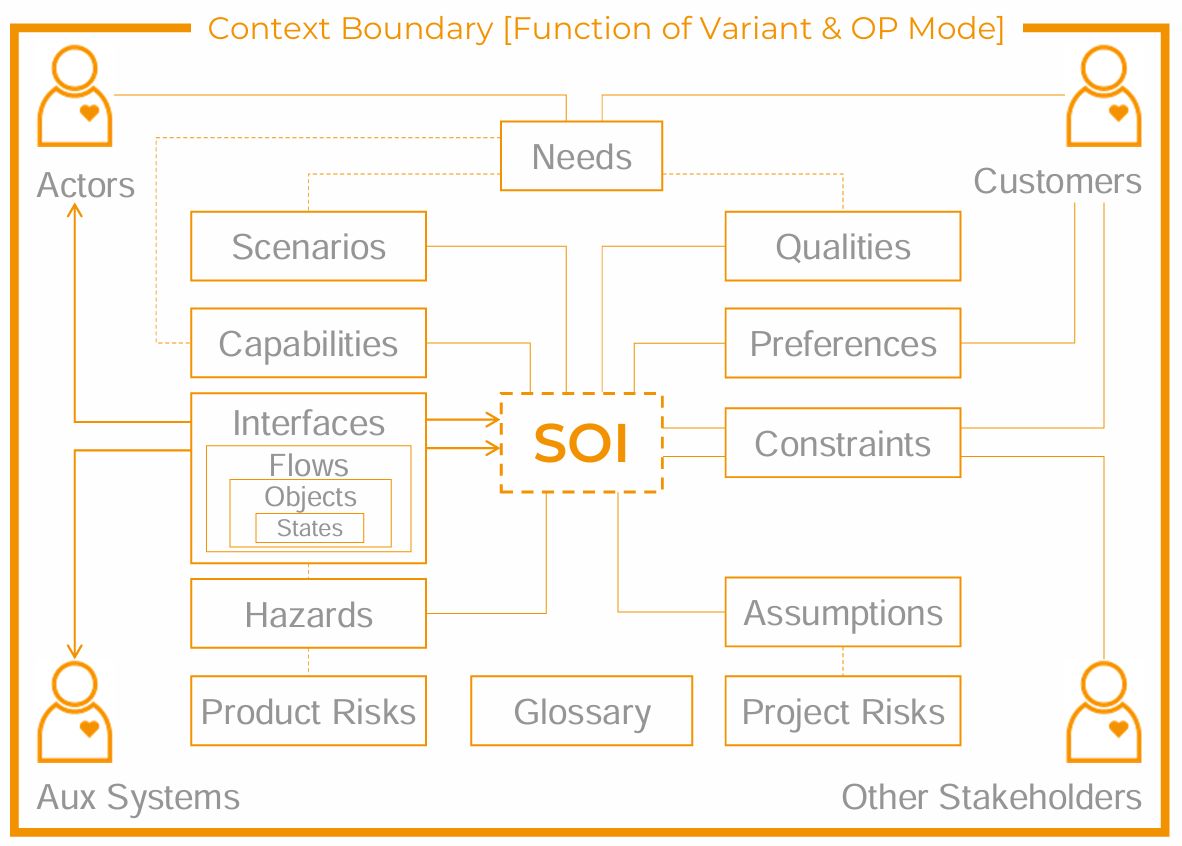
The Contextual Diagram (CD) gives an overview of how Stakeholders connect to the SOI through Artefacts. These Relationships are well-defined and universally the same for all challenges, i.e. they do not change. The boxes in the Diagram represent the type of artefact that shall be collected during the Requirements Elicitation process. The artefacts are stored in a register that only holds artefacts of that particular type. For more information read the ADEPT Process. |
The following image shows the actual Information model used in the ADEPT Tool for the Contextual Architecture.
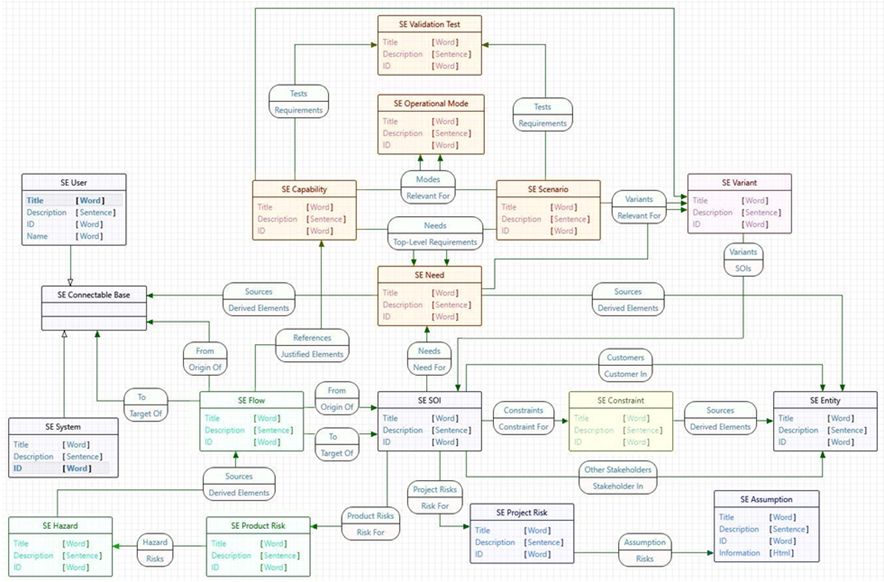
Each square box represents an Entity Type, while the Relationship definitions are shown as 'blobs' on the arrows with a full arrow-head. The 'blobs' contain the semantics of both directions. The arrows with a white arrow head on the other hand represent an in heritance between the Types.
Example: IV-Pump Alarm System
The screenshot below shows the registers of the Contextual Architecture for an alarm system of an IV-pump. The artefacts (blue text) are collected in the registers (boxes with Type description) for the SOI.
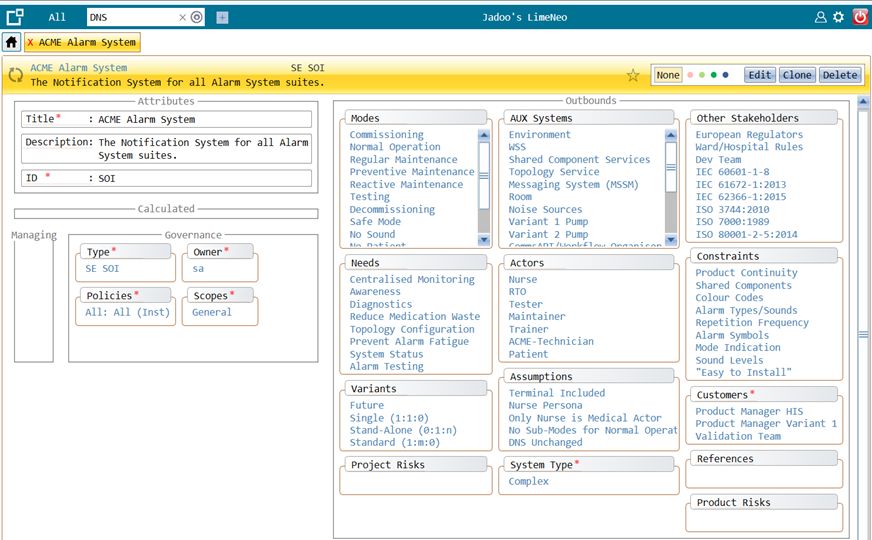
Clicking on any of the blue artefacts will open their detail view. Most of the information on any item is made up of other artefact, i.e. more links to click on. This implements the 'path-definition' advantage explained above.
All information in Lime can be readily exported to be used in the project.
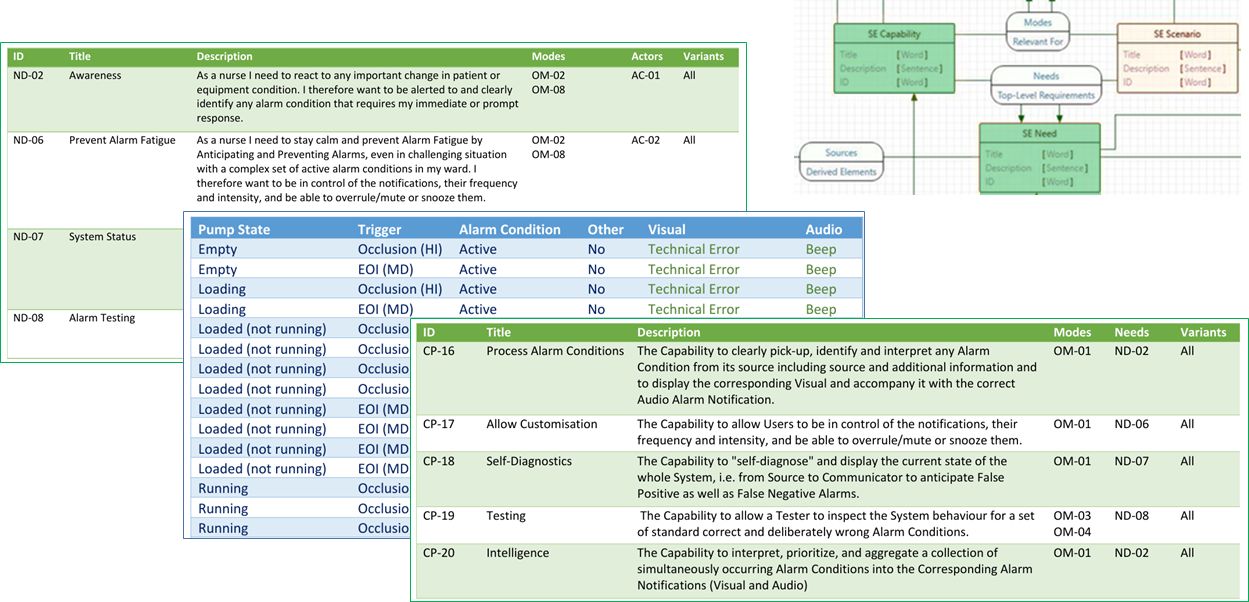
The Contextual Architecture is the basis for the User Requirements document. The information for this document can be used, e.g. in form of a collection of tables. The following image shows the Needs and Capabilities (green) from the Alarm System, as well as a Response Matrix with the expected behaviour of the System.